Apache Kafka is a distributed event streaming platform originally developed by LinkedIn and later open-sourced. Think of it as a super-powered messaging system that can handle millions of messages per second.
Simple Analogy
Imagine Kafka as a super-fast postal service:
Producers = People who send letters (write data)
Topics = Different mailboxes (categories of messages)
Consumers = People who read letters (read data)
Brokers = Post offices (servers that store and manage messages)
Core Concepts
1. Producer
Applications that send/publish data to Kafka
Like a newspaper publisher sending articles
Example:
java
*// Your application sending user activity data* producer.send("user-clicks", "User clicked on button X");
2. Consumer
Applications that read/subscribe to data from Kafka
Like a newspaper reader subscribing to news
Example:
java
*// Another application reading user activity* consumer.subscribe("user-clicks"); String message = consumer.poll();
3. Topic
A category or feed name where messages are stored
Like different newspaper sections (Sports, Business, Entertainment)
Topics are split into partitions for scalability
Example Topics:
user-registrationspayment-transactionserror-logs
4. Partition
Topics are divided into partitions (like splitting a book into chapters)
Enables parallel processing and scalability
Each partition is an ordered, immutable sequence of messages
Topic: "user-events" ├── Partition 0: [msg1, msg2, msg3, msg4] ├── Partition 1: [msg5, msg6, msg7, msg8] └── Partition 2: [msg9, msg10, msg11, msg12]
5. Broker
A Kafka server that stores data
Multiple brokers form a Kafka cluster
Provides fault tolerance and high availability
6. Offset
A unique ID for each message in a partition
Like page numbers in a book
Consumers use offsets to track which messages they've read
Partition 0: Offset 0: "User A logged in" Offset 1: "User B clicked button" Offset 2: "User C made purchase"
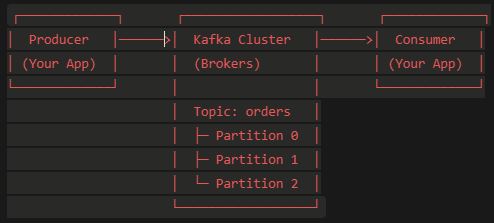
How Kafka Works - Step by Step
Flow Diagram:
Real-World Use Cases
1. Activity Tracking
Track user clicks, page views, searches
Example: Netflix tracking what you watch
User watches "Stranger Things" → Kafka → Recommendation Engine
2. Log Aggregation
Collect logs from multiple servers
Example: Uber collecting driver location logs
1000s of drivers → Kafka → Analytics Dashboard
3. Messaging System
Replace traditional message queues
Example: WhatsApp message delivery
User A sends message → Kafka → User B receives
Key Features
1. High Throughput
Can handle millions of messages per second
Uses batch processing and compression
2. Scalability
Add more brokers to handle more data
Add more partitions for parallel processing
3. Durability & Reliability
Messages are persisted to disk
Replication across multiple brokers
If one broker fails, others have copies
4. Fault Tolerance
Broker 1: Partition 0 (leader), Partition 1 (replica) Broker 2: Partition 1 (leader), Partition 0 (replica) Broker 3: Partition 2 (leader), Partition 0 (replica)
If Broker 1 fails → Broker 2 takes over Partition 0
5. Real-time Processing
Process data as it arrives (milliseconds latency)
No need to wait for batch jobs
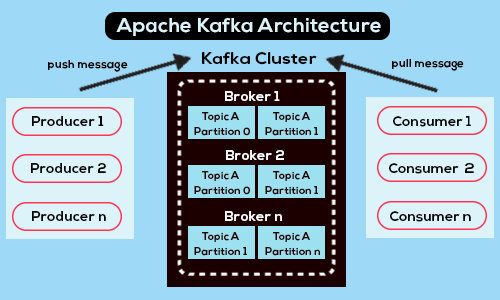
Kafka Architecture :
Internal working of kafka using java :
producer :
import org.apache.kafka.clients.producer.*; import org.apache.kafka.common.serialization.StringSerializer; import java.util.Properties;
public class SimpleProducer { public static void main(String[] args) {
// 1. Kafka server details Properties props = new Properties();
props.put("bootstrap.servers", "localhost:9092");
// Kafka server
props.put("key.serializer", StringSerializer.class.getName());
props.put("value.serializer", StringSerializer.class.getName());
// 2. Create producer
Producer<String, String> producer = new KafkaProducer<>(props);
// 3. Send a message
ProducerRecord<String, String> record = new ProducerRecord<>("test-topic", "Hello from Java Producer!");
producer.send(record);
// 4. Close producer
producer.close();
System.out.println("Message sent successfully!");
}
}
consumer :
import org.apache.kafka.clients.consumer.*;
import org.apache.kafka.common.serialization.StringDeserializer;
import java.time.Duration;
import java.util.Collections;
import java.util.Properties;
public class SimpleConsumer {
public static void main(String[] args) {
// 1. Kafka connection details
Properties props = new Properties();
props.put("bootstrap.servers", "localhost:9092");
props.put("group.id", "test-group");
props.put("key.deserializer", StringDeserializer.class.getName());
props.put("value.deserializer", StringDeserializer.class.getName());
// 2. Create consumer
KafkaConsumer<String, String> consumer = new KafkaConsumer<>(props);
// 3. Subscribe to topic
consumer.subscribe(Collections.singletonList("test-topic"));
// 4. Poll messages
while (true) {
ConsumerRecords<String, String> records = consumer.poll(Duration.ofMillis(100));
for (ConsumerRecord<String, String> record : records) {
System.out.println("Received message: " + record.value());
}
}
}
}
Comments
Join the discussionNo comments yet. Be the first to comment.


